Groups
Groups provide a mechanism to organize and assign multiple Roles to principals efficiently. Instead of assigning roles individually to each user or service, you can assign a group that bundles related roles together.
Overview
A group is a named collection of roles. When a principal belongs to a group, they automatically inherit all the roles defined in that group. Groups simplify identity management by:
- Reducing Administrative Overhead: Assign one group instead of many individual roles
- Ensuring Consistency: All members of a group have the same set of roles
- Enabling Organizational Alignment: Map groups to teams, departments, or functions
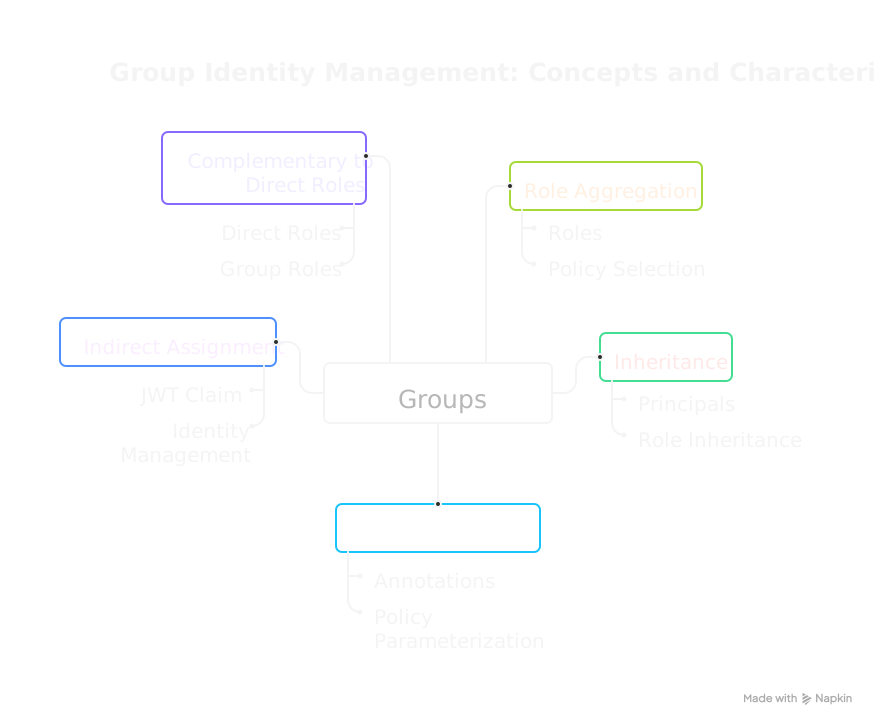
Like Roles, groups serve a dual purpose: they aggregate roles for policy selection, and they can carry annotations that parameterize policy evaluation. Group annotations take precedence over role annotations in the inheritance hierarchy, allowing groups to override role-level defaults (see Parameterizing Policies).
Key Characteristics
- Role Aggregation: Groups contain one or more roles
- Inheritance: Principals inherit all roles from their groups
- Annotation-Enabled: Groups can carry annotations that override role annotations and parameterize policies
- Indirect Assignment: Groups are assigned via the
mgroupsJWT claim - Complementary to Direct Roles: Principals can have both direct roles and group-inherited roles
How Groups Work
Role Resolution
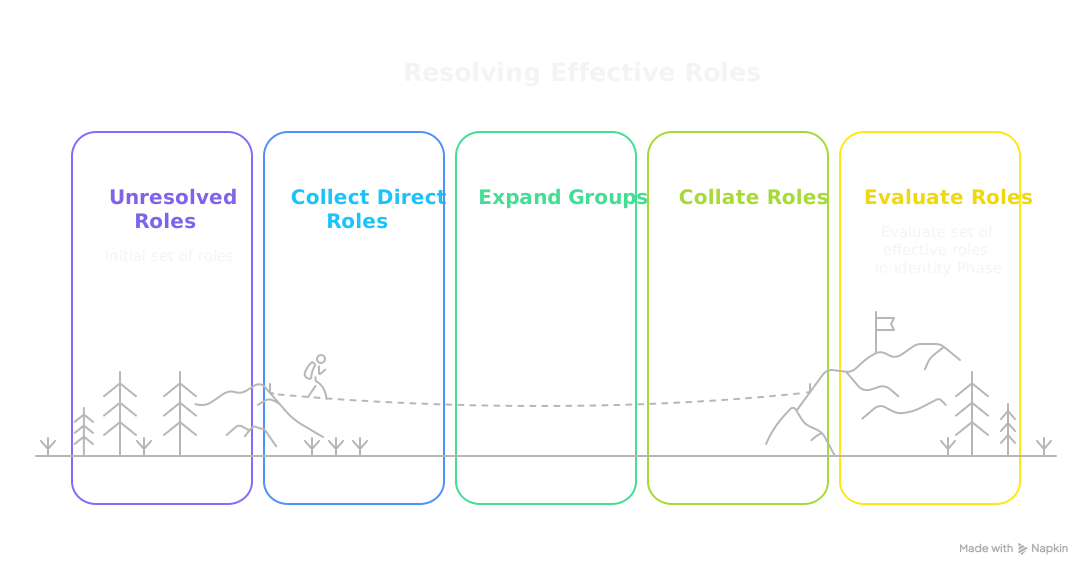
When a request is processed, the PolicyEngine resolves the principal's effective roles by:
- Collecting roles from the
mrolesclaim (directly assigned) - Expanding groups from the
mgroupsclaim into their constituent roles - Evaluating all resolved roles in Phase 2 (Identity Phase)
Phase 2 Evaluation
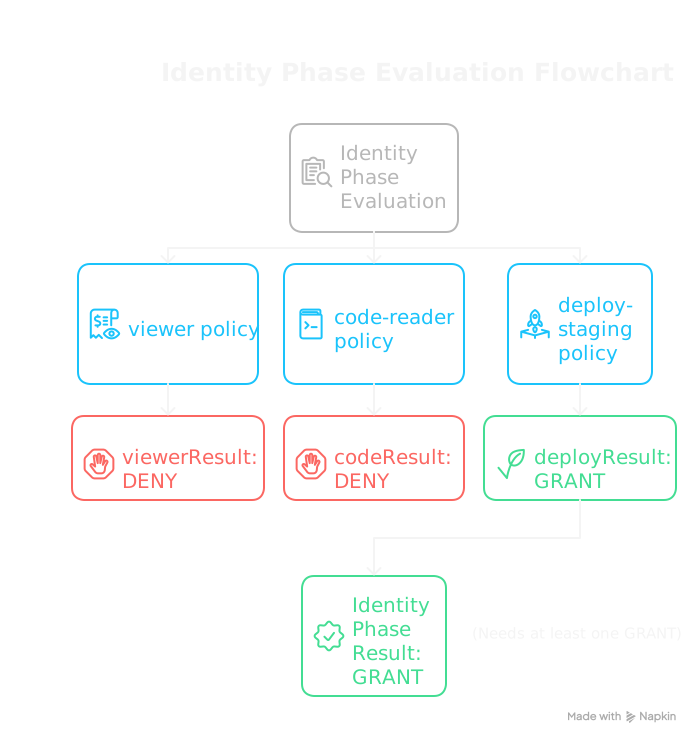
All effective roles—whether direct or group-inherited—are evaluated together in Phase 2:
Defining Groups
Groups are defined in the PolicyDomain under spec.groups:
spec:
  groups:
    - mrn: "mrn:iam:group:admins"
      name: admins
      description: "System administrators"
      roles:
        - "mrn:iam:role:admin"
        - "mrn:iam:role:audit-viewer"

    - mrn: "mrn:iam:group:developers"
      name: developers
      description: "Development team"
      roles:
        - "mrn:iam:role:code-reader"
        - "mrn:iam:role:code-writer"
        - "mrn:iam:role:deploy-staging"

    - mrn: "mrn:iam:group:viewers"
      name: viewers
      description: "Read-only users"
      roles:
        - "mrn:iam:role:viewer"
Each group requires:
- mrn: A unique identifier following the MRN format
- name: Human-readable name
- roles: List of role MRNs that members inherit
Assigning Groups to Principals
Groups are assigned to principals via JWT claims. The PolicyEngine expects groups in the mgroups claim:
# PORC expression showing group assignment
principal:
  sub: "user123"
  mgroups:
    - "mrn:iam:group:developers"
    - "mrn:iam:group:viewers"
Principals can belong to multiple groups, inheriting roles from all of them.
Common Group Patterns
Team-Based Groups
Align groups with organizational teams:
groups:
  - mrn: "mrn:iam:group:engineering"
    name: engineering
    description: "Engineering team"
    roles:
      - "mrn:iam:role:code-access"
      - "mrn:iam:role:ci-access"

  - mrn: "mrn:iam:group:product"
    name: product
    description: "Product team"
    roles:
      - "mrn:iam:role:roadmap-editor"
      - "mrn:iam:role:analytics-viewer"

  - mrn: "mrn:iam:group:support"
    name: support
    description: "Customer support team"
    roles:
      - "mrn:iam:role:ticket-manager"
      - "mrn:iam:role:customer-viewer"
Permission-Level Groups
Create groups based on access levels:
groups:
  - mrn: "mrn:iam:group:read-only"
    name: read-only
    description: "Read-only access across the system"
    roles:
      - "mrn:iam:role:viewer"

  - mrn: "mrn:iam:group:contributors"
    name: contributors
    description: "Can read and write but not administer"
    roles:
      - "mrn:iam:role:viewer"
      - "mrn:iam:role:editor"

  - mrn: "mrn:iam:group:administrators"
    name: administrators
    description: "Full administrative access"
    roles:
      - "mrn:iam:role:viewer"
      - "mrn:iam:role:editor"
      - "mrn:iam:role:admin"
Environment-Scoped Groups
Define groups for different environments:
groups:
  - mrn: "mrn:iam:group:dev-team"
    name: dev-team
    description: "Access to development environment"
    roles:
      - "mrn:iam:role:dev-full-access"

  - mrn: "mrn:iam:group:staging-deployers"
    name: staging-deployers
    description: "Can deploy to staging"
    roles:
      - "mrn:iam:role:staging-deploy"
      - "mrn:iam:role:staging-viewer"

  - mrn: "mrn:iam:group:prod-ops"
    name: prod-ops
    description: "Production operations access"
    roles:
      - "mrn:iam:role:prod-viewer"
      - "mrn:iam:role:prod-deploy"
      - "mrn:iam:role:prod-rollback"
Service Account Groups
Organize service accounts by function:
groups:
  - mrn: "mrn:iam:group:batch-services"
    name: batch-services
    description: "Batch processing service accounts"
    roles:
      - "mrn:iam:role:batch-reader"
      - "mrn:iam:role:batch-writer"

  - mrn: "mrn:iam:group:monitoring-services"
    name: monitoring-services
    description: "Monitoring and alerting services"
    roles:
      - "mrn:iam:role:metrics-reader"
      - "mrn:iam:role:logs-reader"
Groups vs. Direct Role Assignment
When should you use groups versus direct role assignment?
| Scenario | Recommendation |
|---|---|
| Standard team member | Use groups aligned with team/function |
| Temporary elevated access | Direct role assignment (easier to audit/revoke) |
| Service accounts | Groups for common patterns, direct for unique needs |
| Cross-functional access | Multiple group memberships |
| One-off exceptions | Direct role assignment with documentation |
Combining Groups and Direct Roles
Principals can have both:
principal:
  sub: "user123"
  mroles:
    - "mrn:iam:role:special-project-access"  # Direct assignment
  mgroups:
    - "mrn:iam:group:developers"  # Group membership
This allows baseline access through groups with targeted additions via direct roles.
Groups vs. Resource Groups
It's important to distinguish between identity groups and Resource Groups:
| Aspect | Groups (Identity) | Resource Groups |
|---|---|---|
| Contains | Roles | Resource patterns |
| Assigned to | Principals | Resources |
| Phase | Phase 2 (Identity) | Phase 3 (Resource) |
| Purpose | What roles apply to an identity | What policies apply to resources |
| Claim | principal.mgroups | resource.group |
Best Practices
1. Align Groups with Organization
Map groups to real organizational structures:
# Good: Reflects actual team structure
- name: platform-engineering
- name: data-science
- name: customer-success

# Avoid: Generic or confusing names
- name: group1
- name: misc-users
2. Keep Groups Focused
Each group should serve a clear purpose:
# Good: Clear, single purpose
- mrn: "mrn:iam:group:security-auditors"
  roles:
    - "mrn:iam:role:audit-viewer"
    - "mrn:iam:role:compliance-viewer"

# Avoid: Kitchen-sink groups
- mrn: "mrn:iam:group:everything"
  roles:
    - "mrn:iam:role:admin"
    - "mrn:iam:role:finance"
    - "mrn:iam:role:hr"
    # ... many more unrelated roles
3. Document Group Purpose
Include descriptions to clarify group intent:
groups:
  - mrn: "mrn:iam:group:incident-responders"
    name: incident-responders
    description: "On-call engineers with elevated access for incident response"
    roles:
      - "mrn:iam:role:prod-viewer"
      - "mrn:iam:role:prod-restart"
      - "mrn:iam:role:logs-viewer"
4. Leverage Annotations for Metadata
Groups can carry annotations that flow to principals during evaluation. Group annotations override role annotations but are overridden by scope and principal annotations:
groups:
  - mrn: "mrn:iam:group:finance"
    name: finance
    description: "Finance department"
    roles:
      - "mrn:iam:role:finance-user"
    annotations:
      - name: "department"
        value: "\"finance\""
      - name: "cost_center"
        value: "12345"
      - name: "data_access"
        value: "\"financial\""
This inheritance hierarchy (Roles → Groups → Scopes → Principal) makes groups ideal for team-level metadata that overrides role defaults but can still be specialized by scopes or individual principal claims.
5. Review Group Membership Regularly
Periodically audit:
- Principal membership assignment
- Whether group role assignments are still appropriate
- Unused or redundant groups that can be consolidated
Related Concepts
- Roles: The individual permissions that groups contain
- Annotations: Metadata on groups (overrides role annotations, overridden by scopes/principal)
- Policy Conjunction: How group-inherited roles fit into evaluation
- Scopes: Access-method constraints with higher annotation precedence than groups
For schema details, see the Groups Schema Reference.