Resource Groups
Resource Groups are the mechanism for associating policies with sets of resources. They enable resource-level access control by defining which policy governs access to resources within each group.
See also: Resources
Overview
Resource Groups serve as the bridge between resources and policies:
- Every resource belongs to exactly one Resource Group
- Each Resource Group references exactly one policy
- The policy determines access control for all resources in that group
- A default group can be designated for resources that don't specify a group
Like identity entities (Roles, Groups, Scopes), resource groups serve a dual purpose: they link to a policy for access evaluation, and they can carry annotations that parameterize policy decisions. Resource group annotations flow into input.resource.annotations, providing default metadata for all resources in the group. Individual Resources can override these defaults with their own annotations (see Parameterizing Policies).
How Resource Groups Work
When a request involves a resource:
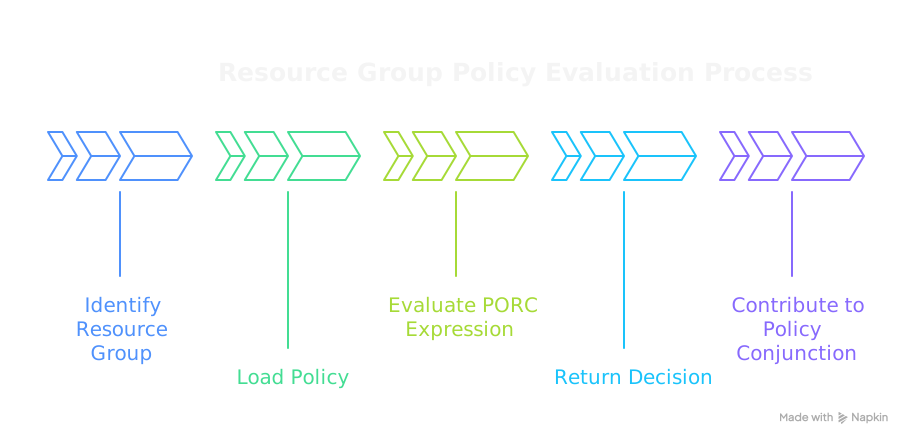
- The PolicyEngine identifies which Resource Group the resource belongs to
- The group's associated policy is loaded for Phase 3 (Resource Phase) evaluation
- The policy evaluates the PORC expression and returns GRANTorDENY
- This decision contributes to the overall Policy Conjunction
Defining Resource Groups
Resource Groups are defined in the spec.resource-groups section of a PolicyDomain:
spec:
  resource-groups:
    - mrn: "mrn:iam:resource-group:public"
      name: public
      description: "Publicly accessible resources"
      policy: "mrn:iam:policy:allow-all"

    - mrn: "mrn:iam:resource-group:internal"
      name: internal
      description: "Internal resources requiring authentication"
      default: true  # Default group for unassigned resources
      policy: "mrn:iam:policy:authenticated-only"

    - mrn: "mrn:iam:resource-group:sensitive"
      name: sensitive
      description: "Sensitive resources with strict access controls"
      policy: "mrn:iam:policy:clearance-required"
Fields
| Field | Type | Required | Description |
|---|---|---|---|
mrn | string | Yes | Unique MRN identifier for the group |
name | string | Yes | Human-readable name |
description | string | No | Description of the group's purpose |
default | boolean | No | Use as default for unassigned resources |
policy | string | Yes | MRN of the policy to apply |
annotations | array | No | List of name/value objects for custom metadata |
Default Resource Group
One Resource Group can be marked as default: true. This group applies to any resource that doesn't explicitly specify a group:
resource-groups:
  - mrn: "mrn:iam:resource-group:default"
    name: default
    description: "Default access policy for all resources"
    default: true
    policy: "mrn:iam:policy:authenticated-only"
If no default is specified and a resource doesn't have a group, the request will be denied (fail-closed behavior).
Resource Group Annotations
Annotations on Resource Groups provide metadata that:
- Can be accessed by policies
- Are inherited by resources in the group (resource-level annotations override group-level)
resource-groups:
  - mrn: "mrn:iam:resource-group:pii-data"
    name: pii-data
    description: "Personally identifiable information"
    policy: "mrn:iam:policy:pii-access"
    annotations:
      - name: "compliance"
        value: "\"GDPR\""
      - name: "audit_required"
        value: "true"
      - name: "retention_days"
        value: "365"
Use annotations in policies:
package authz

default allow = false

# Require audit for resources in groups marked audit_required
allow {
    input.resource.annotations.audit_required == "true"
    input.principal.mroles[_] == "mrn:iam:role:auditor"
}
Assigning Resources to Groups
Resources are assigned to groups in two ways:
1. At Request Time
The calling application specifies the group in the PORC expression:
{
  "principal": { ... },
  "operation": "data:read",
  "resource": {
    "id": "mrn:data:document:12345",
    "group": "mrn:iam:resource-group:sensitive"
  },
  "context": { ... }
}
2. Via Resource Routing (v1alpha4+)
Define patterns in the resources section to automatically route resources to groups based on their MRN:
spec:
  resources:
    - name: sensitive-data
      description: "Route sensitive data to restricted group"
      selector:
        - "mrn:data:sensitive:.*"
        - "mrn:secret:.*"
      group: "mrn:iam:resource-group:sensitive"

    - name: public-assets
      description: "Route public assets to public group"
      selector:
        - "mrn:assets:public:.*"
      group: "mrn:iam:resource-group:public"
When a resource MRN matches a selector pattern, it's automatically assigned to the corresponding group. See Resources for more details on resource routing.
Example: Tiered Access Model
A common pattern is tiered resource groups based on sensitivity:
spec:
  # Define policies for each tier
  policies:
    - mrn: "mrn:iam:policy:public-access"
      name: public-access
      rego: |
        package authz
        default allow = true  # Anyone can access

    - mrn: "mrn:iam:policy:authenticated-access"
      name: authenticated-access
      rego: |
        package authz
        default allow = false
        allow { input.principal.sub != "" }

    - mrn: "mrn:iam:policy:clearance-access"
      name: clearance-access
      rego: |
        package authz
        default allow = false
        ratings := {"LOW": 1, "MODERATE": 2, "HIGH": 3, "MAXIMUM": 4}
        allow {
          ratings[input.principal.mclearance] >= ratings[input.resource.classification]
        }

  # Define resource groups using those policies
  resource-groups:
    - mrn: "mrn:iam:resource-group:public"
      name: public
      description: "Public resources - no auth required"
      policy: "mrn:iam:policy:public-access"

    - mrn: "mrn:iam:resource-group:internal"
      name: internal
      description: "Internal resources - auth required"
      default: true
      policy: "mrn:iam:policy:authenticated-access"

    - mrn: "mrn:iam:resource-group:classified"
      name: classified
      description: "Classified resources - clearance required"
      policy: "mrn:iam:policy:clearance-access"
Resource Groups vs. Groups
It's important to distinguish between Resource Groups and identity Groups:
| Aspect | Resource Groups | Groups (Identity) |
|---|---|---|
| Contains | Resource patterns | Roles |
| Assigned to | Resources | Principals |
| Phase | Phase 3 (Resource) | Phase 2 (Identity) |
| Purpose | What policies apply to resources | What roles apply to an identity |
| PORC field | resource.group | principal.mgroups |
Best Practices
-
Always define a default group: Ensures fail-closed behavior for resources without explicit group assignment
-
Use meaningful names: Group names should clearly indicate the access policy (e.g., "public", "internal", "sensitive")
-
Keep policies focused: Each resource group policy should handle one access pattern
-
Leverage annotations: Use group-level annotations for shared metadata across resources
-
Document groups: Use the description field to explain when resources belong in each group
-
Use resource routing: For large systems, use MRN patterns to automatically assign resources to groups rather than relying on callers to specify groups
Related Concepts
- Resources: The entities that belong to resource groups
- Policies: The Rego code referenced by resource groups
- Policy Conjunction: How resource policies (Phase 3) combine with other phases
- Annotations: Metadata inheritance from groups to resources