Integration Overview
This section explains how to integrate the Manetu PolicyEngine into your application using the Policy Decision Point (PDP) and Policy Enforcement Point (PEP) architecture.
Architecture
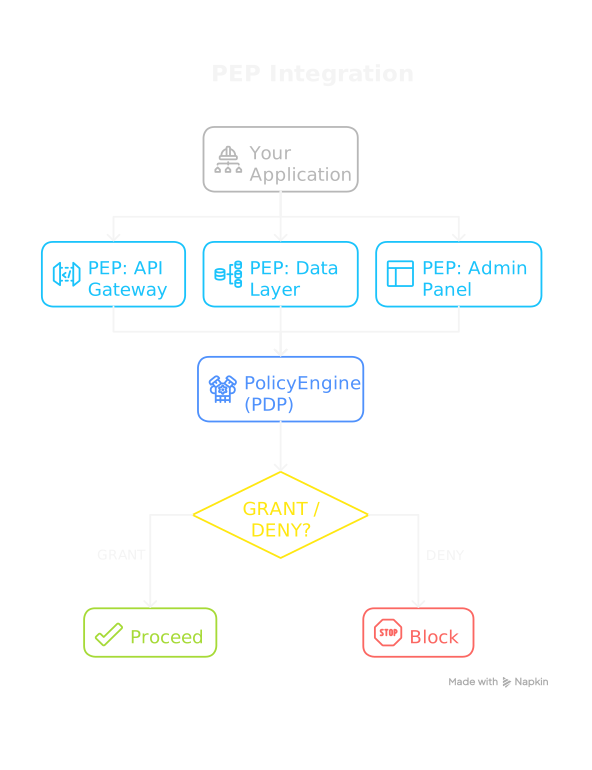
The Manetu PolicyEngine serves as a Policy Decision Point (PDP)—it evaluates policies and returns access control decisions. To integrate the PolicyEngine, you create one or more Policy Enforcement Points (PEPs) in your application that call the PDP.
Key Components
Policy Decision Point (PDP)
The PDP is the Manetu PolicyEngine itself. It:
- Receives authorization requests in PORC format
- Evaluates them against policies written in Rego
- Returns GRANT or DENY decisions
- Is stateless and can be scaled horizontally
The PDP knows nothing about your application's business logic—it only evaluates policies against the inputs it receives.
Policy Enforcement Point (PEP)
A PEP is code within your application that enforces access control. Each PEP is responsible for:
- Formulating a PORC expression - Constructing the Principal, Operation, Resource, and Context from the current request
- Invoking the PDP - Calling the PolicyEngine's authorization endpoint
- Handling the decision - Deciding what to do when the PDP returns GRANT or DENY
Integration Steps
1. Choose Your Integration Method
The PolicyEngine provides two integration options:
| Method | Best For |
|---|---|
| HTTP API Community Premium | Any language — Python, Java, TypeScript, Go, and more |
| Embedded Go Library Community Only | Go applications needing lowest latency |
Considerations for Future Growth
When choosing an integration method, consider your long-term needs:
| Consideration | HTTP API | Embedded Go Library Community Only |
|---|---|---|
| Language support | Any language | Go only |
| Latency | Low (network call) | Lowest (in-process) |
| Deployment | Separate service or sidecar | Single artifact |
| Scaling | Varies (See Deployment Options) | Scales with application |
| Premium Edition Compatible | Yes | No |
Quick Decision Guide
Choose the HTTP API when:
- Your application is written in any language (Python, Java, TypeScript, Go, etc.)
- You want to share a PDP across multiple services
- You need to scale the PDP independently of your applications
- You want the option to migrate to Premium Edition in the future
Choose the embedded Go library when:
- Your application is written in Go
- You need the absolute lowest latency (in-process, no network overhead)
- You prefer a single deployment artifact
- You don't need Premium features
2. Build Your PORC Expressions
Learn how to construct proper authorization requests:
- PORC Expressions - Understanding the PORC structure (in Concepts)
- Resource Resolution - Using MRN strings vs fully-qualified descriptors
3. Implement Your PEPs
Create enforcement points in your application that:
- Extract identity from authentication tokens
- Build PORC expressions from request context
- Call the PDP and handle decisions
See Best Practices for implementation guidance.
Quick Example
Here's a minimal PEP implementation:
// 1. Build PORC expression
porc := map[string]interface{}{
    "principal": map[string]interface{}{
        "sub":    claims.Subject,
        "mroles": claims.Roles,
    },
    "operation": "api:documents:read",
    "resource":  "mrn:app:myservice:document:12345",
    "context":   map[string]interface{}{},
}

// 2. Call PDP
allowed, err := pdp.Authorize(ctx, porc)

// 3. Handle decision
if !allowed {
    return ForbiddenError
}
// Proceed with operation...
Section Contents
- HTTP API - Integrate from any language via HTTP
- Embedded Go Library - Embed directly in Go applications for lowest latency
- Resource Resolution - MRN strings and resource metadata
- Best Practices - Implementation guidelines
For understanding the PORC format itself, see PORC Expressions in the Concepts section.